
ISP routers from Verizon (FIOS), and Comcast are often lacking traditional features of off-the-shelf routers, but can easily be replaced. Note that Verizon will tell you using their router is “required”, and you will lose support, but things are so much easier when you have a device that actually works and is documented.
In this article we are looking at the Ubiqity “Unifi” line of networking targeted at advanced home and small business. This is an introductory/overview post and may be followed with more technical details in the future.
The features of the Unifi system are particularly interesting and affordable. This article covers replacement of a Verizion FIOS router + Mesh repeater with a Unify system. See store at: https://store.ui.com/us/en
This is an Introductory article on why you might want to replace your consumer Router with a Ubiqity/Unifi system. While this could be just a router, in larger homes additional devices may be needed to cover the larger area. Many manufactures support a “Mesh” system to expand coverage without any additional wiring. Unifi supports Mesh in all their Access Points ( AP’s) but recommend adding an Ethernet up-link to each AP for improved perfomance.
Note: Comcast typically distributes a Modem + Router combo, and for that case you would need to continue to use their modem, but disable the router portion. That is not covered here.
Note: Verizon features requiring COAX ( such as TV over FIOS) are not supported by this document, but you can certainly use your TV with Streaming services over Ethernet. The Verizon Optical Network Terminal (ONT) typically has both COAX and Ethernet outputs, and you may need to Verizon’s help to activate the Ethernet output if not done at install time.
Why replace the Verizon router ?
For this project the Verizon system had just been installed at a friends house and the following issues were immediatly noted.
- Lacks ability to assign static IP’s to local services such as Synology storage, Camera’s, and Printers
- Lacks support for multiple vLAN’s to separate IOT and Guest devices from business devices
- Existing “Guest” network on Verizon did not actually separate guest traffic from other networks.
- Lacks ability to manage typical services such as Firewall, DNS, DHCP, etc.
In addition some features of the Verizon router seemed to be usable only by logging into a Verizon portal site and that would configure/push changes to the router. Many folks prefer the older model where you are in complete control of your own Router from a local interface.
My guess is that to reduce setup/support costs that the Verizon router has been dumbed down to remove most features, and only support the typical consumer. This means, in general, that consumers would use ‘cloud’ services for everything, and local servers needing static local IP’s and such are not well supported.
Switching to Unifi equipment
If you replace the Verizon router you will prevent Verizon from having a back-door access into your router from their portal. Your Unifi router will be completely managed locally or through the Unifi portal. You will lose any FIOS TV service, but can simply switch to using Streaming services over Ethernet.
Architecture
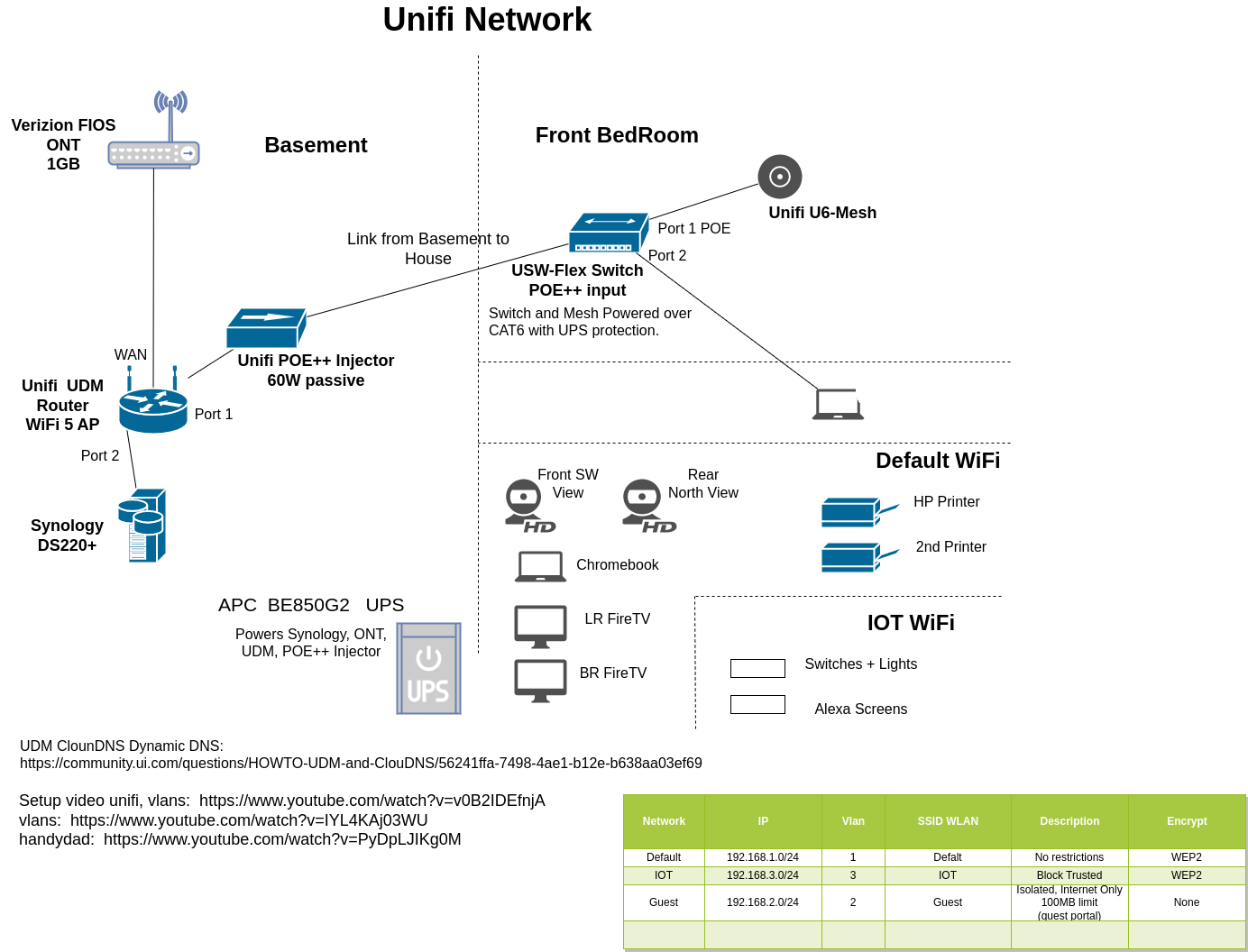
The existing Verizon solution had a Verizon router and a wireless mesh repeater. This provided coverage, but did not support static IP’s for our equipment. The Verizon ONT device was in the basement and we had one Ethernet cable available from the Basement to a bedroom corner near the center of the house. Note that while mesh does work, it’s always preferable to have Ethernet connections.
For this design we chose to place the majority of the equipment in the basement next to the Verizon ONT terminal. Here we have:
- Unifi “Dream Machine” router
- Synology DS220+ NAS
- Unifi POE power injector
- Synology Power brick
- APC BE-850 G2 UPS ( Not shown )
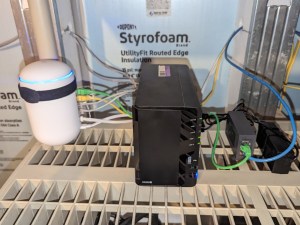
The “Dream machine” contains the following sub-components:
- Unifi controller
- Wifi 5 Access Point
- 4 port Ethernet switch
- Network Firewall with integrated full speed IDS/IDP security
Note the “Dream Machine” is now legacy, and replaced with various options such as:
UX, UCG-Ultra, UCG-Max, UDW see: https://store.ui.com/us/en?category=all-unifi-cloud-gateways
The equipment located on the 1st floor includes the following:
- Wifi 6 AP ( Unifi U6-Mesh )
- Small POE switch ( Unifi USW-Flex )
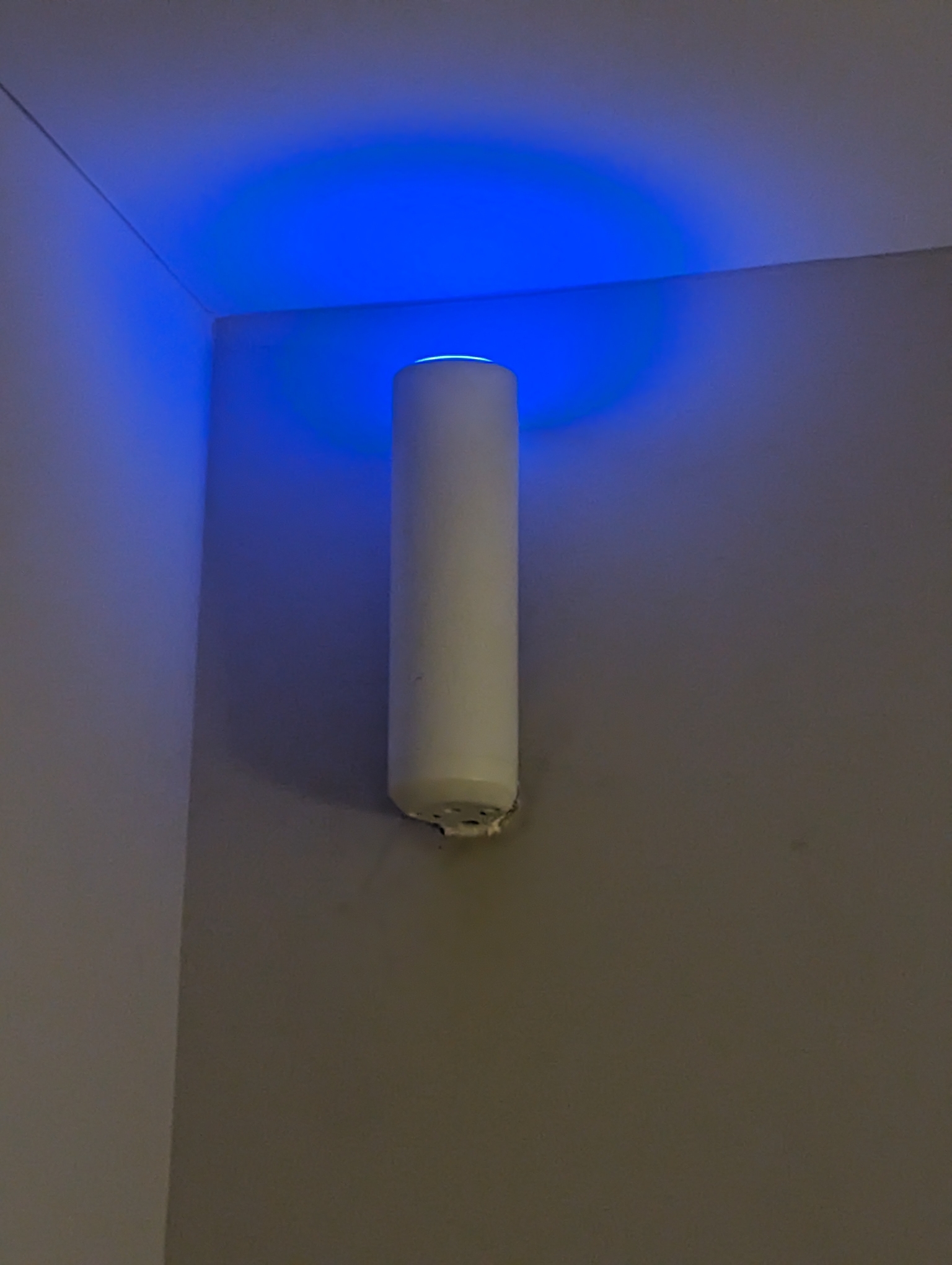
The U6-Mesh is a small wall-mountable Access Point with POE power. Note the location high up on the wall.
This corner of the room is near the center of the house, with the Kitchen ( and a metal oven ) on the other side of the wall. By locating the unit here the oven does not block the signal from other parts of the house. The U6-Mesh is powered over the Ethernet cable running down inside the wall to a USW-Flex switch below it.
Directly below the U6-Mesh unit we installed the USW-Flex power-over-ethernet switch. One Cat 6 cable ( not visible ) was fished up the wall to the U6-Mesh.
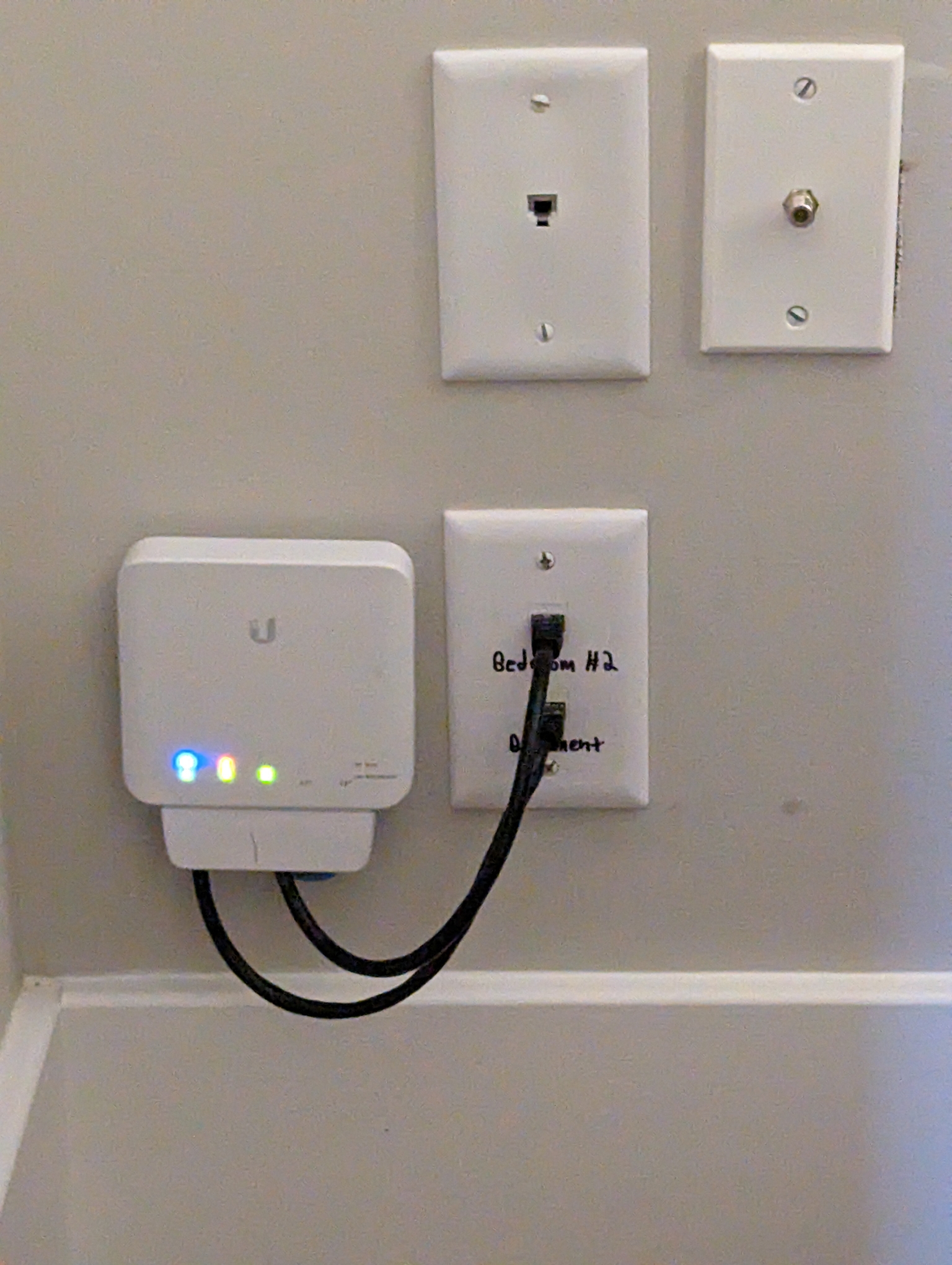
There are three connection to the USW-Flex.
- POE++ Ethernet power input connection from basement (60W)
- POE+ Ethernet connection to the U6-Mesh ( not visible )
- Ethernet connection to adjacent room ( office )
The USW-Flex is a special Ethernet switch that accepts Power in (POE++) and also distributes power out as needed on it’s ports. The advantage of having POE is that we have no visible power cords. A second advantage is that our single UPS unit in basement to powers all our Wifi equipment for about 30 minutes. The UPS is also very important to protect against software upsets from short power glitches on the AC power.
For POE, See: https://www.crystalrugged.com/knowledge/poe-vs-poe-plus-vs-poe-plus-plus-switch/
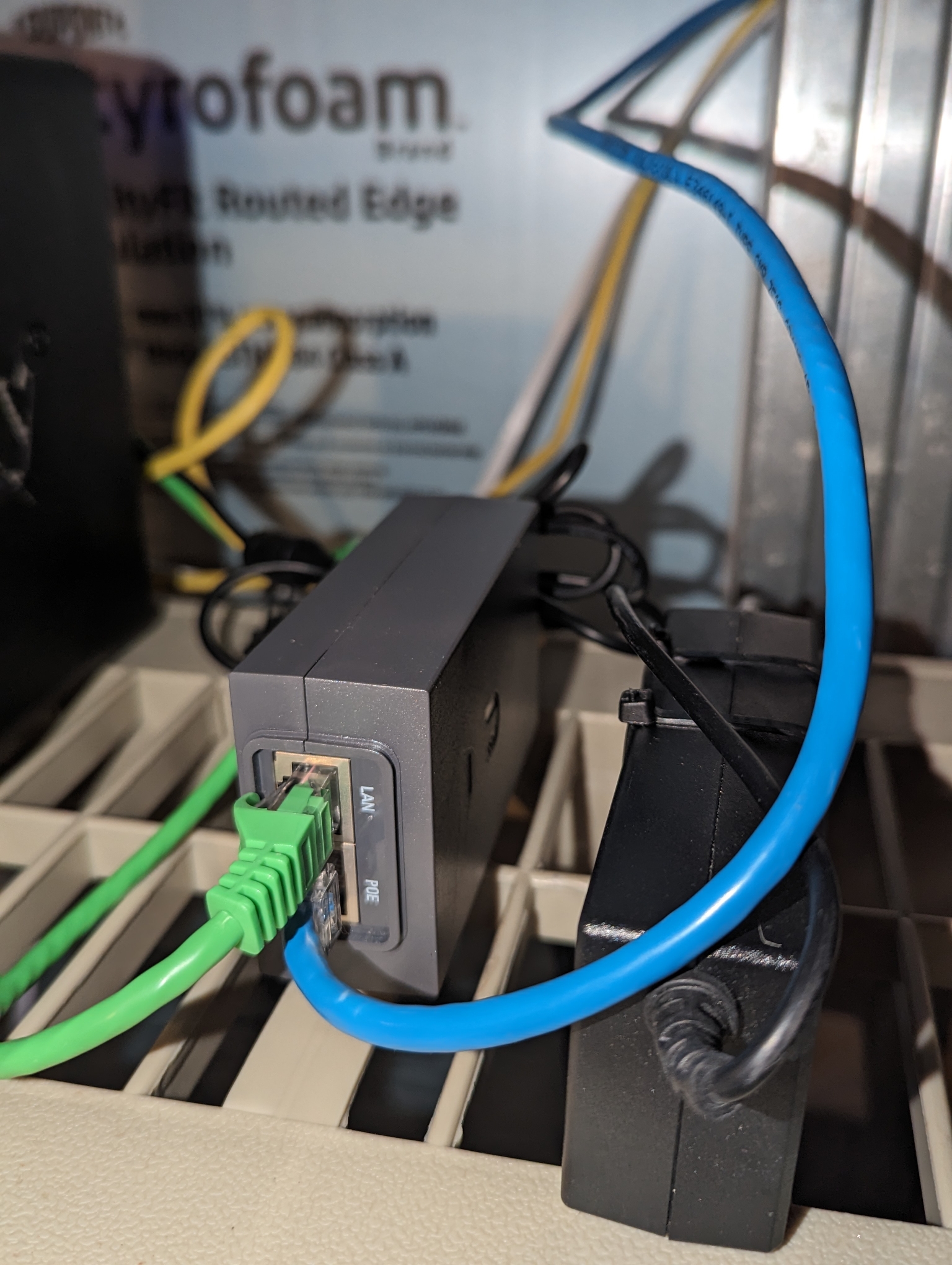
A close up of the POE++ (60W passive ) injector in the basement is here. The USW-Flex switch is specially designed for using POE++ inputs and supplies one POE+ output to the U6-Mesh, as well as the Switch’s power.
Verizon Notes
Verizon FIOS typically uses DHCP to assign WAN address, but there are few additional steps.
You may need to:
- Have Verizon activate the “Ethernet” output of the ONT and connect that to Unifi WAN input
- Using the COAX output of the ONT for TV service will likely not work
- Release the IP from the old Verizon router, to enable Unifi to get a IP quickly
See: https://www.techlicious.com/Tip/How-to-use-your-own-router-for-verizon-fios/comments-/CP3/
Security Notes
For best security it’s best to maintain multiple networks that are isolated from each other.
Generally some Firewall rules are needed to allow the following ( rules not covered here )
For example we would like 4 zones with following rules.
- Business
Business computer and Synology
Allowed to connect out to anywhere - Home / Kids
Not allowed to connect to Business, but can connect to IOT - IOT devices
Contains Alexa devices, Printers, Smart TV’s, Phones ( note that smartphones are considered IOT
Internet allowed out, but no connections allowed to Home or Business - Guests
Internet Allowed out, no connections to Home or Business or IOT networks.
Guest WiFi portal ( sign in via password on web page )
100Mb/sec rate limit ( so guests cant swamp connection )
While it’s beyond scope of this document, Unify supports multiple vLANS on wired Network, and at least 4 Wifi SSID’s per AP ( each connected to a different vLAN )
A new Unity Network release ( in preview as of Dec 2024 ) supports Firewall Zone rules and should be easier to configure.
Reference
For reference a network diagram is here:
Links
Relevant Unifi links I found while working with Unifi. None of these have been specifically implemented, but used in general. These may be organized in future posts. New Unifi Firewalls now support Zones, which may simplify this even more. Note many Unifi controllers also support IP camera’s, DVR, and Intrusion Detect/Prevention, and inboud VPN.
- General
- Benifits of Unifi discussion
https://www.reddit.com/r/HomeNetworking/comments/16ijibm/what_are_the_benefits_of_unifi_home_networking_to/ - Why I bought Unifi for home
https://www.youtube.com/watch?v=VQor5-pMYs4 - Unifi for Newbies ( why, IOT separation )
https://www.youtube.com/watch?v=0AUqaf3wDQU - Angry Dad’s guide to Home networking ( Switch to Unifi )
https://www.youtube.com/watch?v=2Jr_yDKU7UY
- Benifits of Unifi discussion
- Security
- DNS
- Using Dynamic DNS from CloudNS
https://community.ui.com/questions/HOWTO-UDM-and-ClouDNS/56241ffa-7498-4ae1-b12e-b638aa03ef69
- Using Dynamic DNS from CloudNS
 Nuance of iqlusion